¶ How to create a custom component
Create a custom component when you want to give part of a structure its own representation, for example a key residue, an epitope or a binding site.
Prerequisites: a structure shown in the 3D viewer.
- Click the residues you want. To select atoms or chains, change the selection level from Residue first.
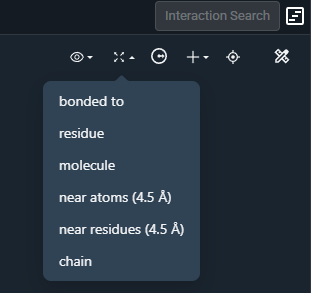
- Optional: click Expand Selection in the selection toolbar and choose an option, for example "Near residues (4.5 Å)".
- Optional: click any residue, ligand or chain you want to remove from the selection.
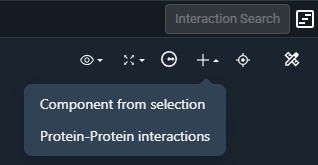
- Click Create component (+) and select Component from selection.
Result: the component is listed in State Tree → Custom Components, where you can change its visibility, representation and color like any other item.
¶ Variations
- Residues around a ligand: select the ligand and click Create surroundings. 3decision already creates a 5 Å surroundings component for each ligand.
- Interface between chains: select Protein-Protein interactions in step 4 instead. See How to show interactions between chains.
¶ Related
- Feature: Selections